


Hello everyone!
Today's release features an update to the Desktop app, user‑reported fixes, and improvements. Thank you for your patience as we work to deliver features and fixes. Below are the details for today’s production release.
Release Summary⚠️ Desktop app v2.3.2 required
Scope-respecting filters
Un-mirror linked items
System-browser authentication for desktop
Fix for space-bar unintended scroll
Correct Workflowy OPML date imports
Outlook & Shortwave email drag-and-drop fixes
24-hour time format option
Date marker enhancements
Custom local backups
Details
Scope respecting filters
Whether you are zoomed in to a particular section or only on one document, the Agenda view and filters brought in additional items. The fix restricts matches to only what is in view.
Reported issues - Agenda bringing completed, Completed items are not being filtered from group by date viewsUn-mirror linked items
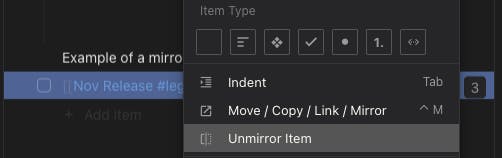
Mirrored items can now be “un-mirrored” via a new context‑menu action. This clones the mirrored item and removes the link. In the past, it was impossible to delete just the mirrored location if you didn't undo in time.Authenticate with the system browser for the Desktop app.
We now use your existing system browser to sign in or approve sync requests when using the desktop app. This reduces friction when searching for your Gmail password in the Desktop application. The new flow opens a browser tab to request sign-in.
ℹ All users will be prompted to re‑authorize after the desktop app upgradeFix for space bar causing unintended scroll.
Pressing the space bar to scroll in multi‑pane views previously caused unintended defocus. The change-detection logic is now fixed and no longer triggers a defocus.
Reported Issue: space‑bar‑is‑causing‑unintended‑scrollCorrect import of date mentions from Workflowy OPML exports
When importing OPML files from Workflowy, date mentions inside items were not always parsed correctly. This release resolves the date mention import issue, so your imported outlines retain their intended dates in notes such as this:Outlook and Shortwave Email Drag & drop fixes
Shortwave and Outlook login & email dragging were broken. With the fix, you can now drag emails from Outlook and Shortwave directly into Legend.
ℹ️ We will need to update when the platforms have significant UI changes.24‑hour time format option
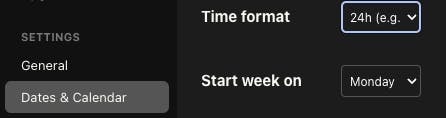
Legend now supports a 24‑hour time format. Enable it in your settings if you prefer to see times without AM/PM. Reported issue: 12h/25 time format settingDate marker enhancements
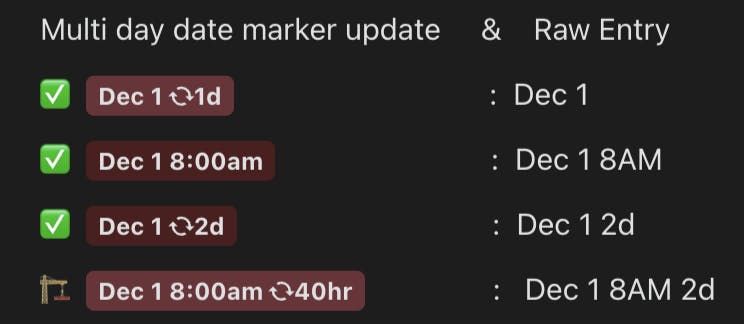
Date chips now display ranges when appropriate, making it clear when an item spans multiple days. Let us know what you think, the last one could use some improvements.Custom Local Backups
The updated binary will finally enable the desktop app to support local backups and custom directories for both backups and documents. Use your own directory to make sure existing local backups aren’t deleted during an app update.

Best,
- Yonz