


Hello everyone!
Today's release features our final fix and feature push before the much-anticipated sync upgrade (the only priority for January). Thank you for your patience as we work to deliver features and fixes.
December Release Summary
$50 Holiday Credit 🎁
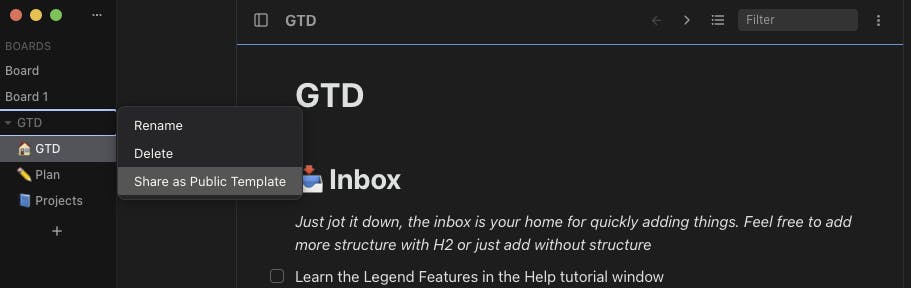
Template Sharing
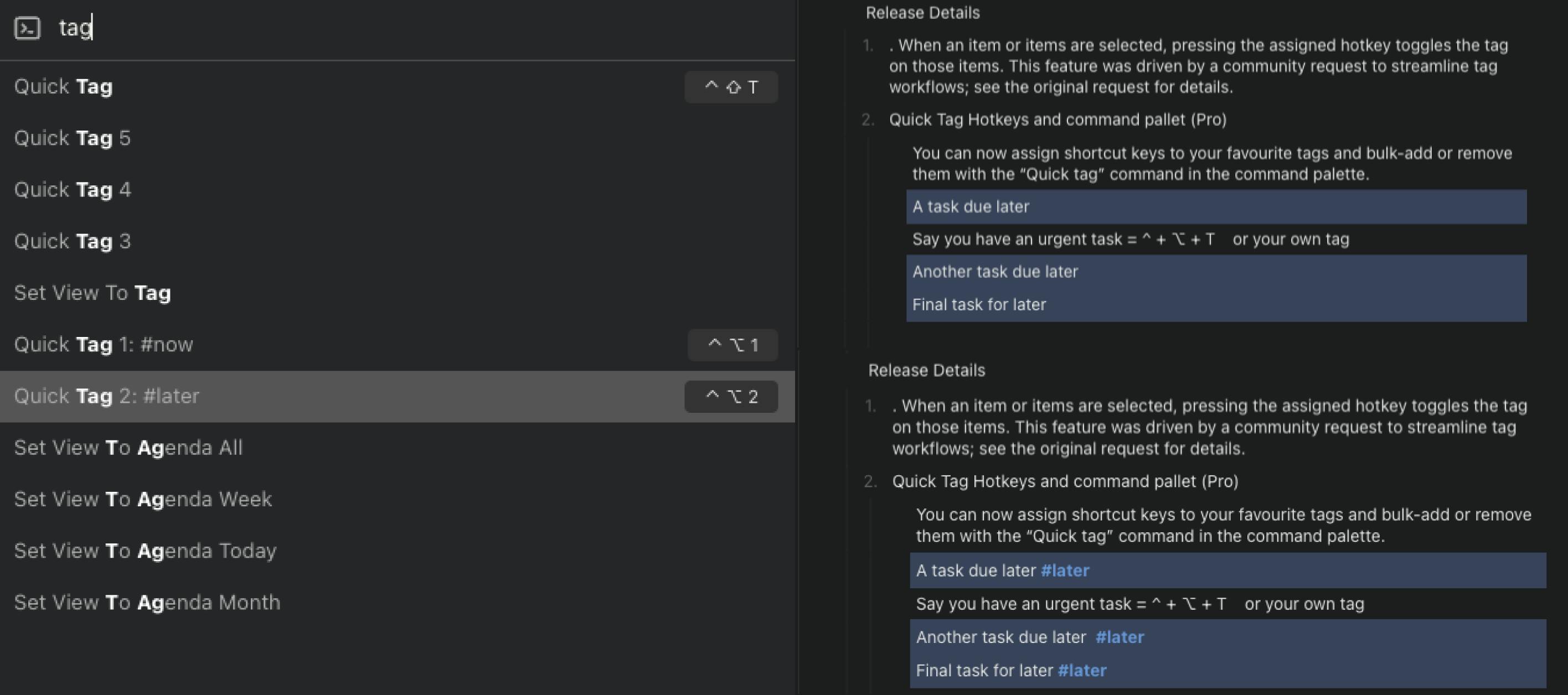
Quick Tag & Hotkeys (Pro)
Recursive expand Outline/Overview
Fix: Scope respecting filters & Agenda View
Fix: Persist Scroll Position
Fix: Board‑dragging fix
Fix: Zoom‑out & collapse‑state fixes
Fix: Multi‑day date chip handling
Fix: Collapsed state chevron fixes
Release Details
$50 Holiday Credit – Happy New Year from all of us at Legend 🥳. Click here to upgrade to an annual plan to claim the credit.
Template Sharing
Craft your perfect board, folder, and document, and share them with other Legends. This is the first phase of template sharing; the team will follow up with a GTD template and an updated starter board to help users jump‑start new workflows. Checkout our GTD template by clicking here
Quick Tag Hotkeys and command pallet (Pro)
You can now bulk add or remove your favorite tags from items by assigning shortcut keys (^ + ⌥ + 1) to your favorite tags or with the “Quick tag” command in the command palette.
Reported issue: Add/remove tags with shortcut keys – LegendFix: Board Dragging Fix
A user‑reported issue where board dragging wasn’t taking effect and caused a visual glitch has been fixed. Dragging lists or cards should now behave correctly and feel more snappy. Reported Issue: Side bar visual glitch
Fix: Scope respecting filters & Agenda View
Whether you are zoomed in on a particular section or on a single document, matches are now restricted to items in the view. In the past, the Agenda view and filters used to pull in items that were not in view. Reported issue - Agenda bringing completed, Completed items are not being filtered from group by date views
Recursive Expand Outline/Overview - Click "Expand all recursively" to expand nested headers and see all subsequent items expanded in the outline view. “Expand all" expands all immediate items.
Fix: Persist Scroll Position - Navigating between items or zooming in/out now remembers your scroll position. Now it's easier to pick up where you left off without needing to refind your place.
Fix: Zoom‑Out to inferred parent
The zoom‑out hotkey now takes you to the correct parent item when inferred hierarchy is enabled in settings (indented hierarchy works as expected).Fix: Collapse‑State Fixes - A bug that caused overview sections to sometimes display the wrong collapsed/expanded chevron state after collapsing or expanding items has been fixed.
Fix: Multi-day event date chip updated: Multi‑day events now display correct date ranges in the date chip, making multi‑day tasks clearer.

Thank you to everyone who reported issues and tested the beta releases. Your feedback is invaluable in shaping Legend. If you encounter any bugs or have suggestions, please drop a comment below.
-Yonz