


I'm seeing some list view behavior that I'm not sure is intended or is a bug. Let's assume this structure:
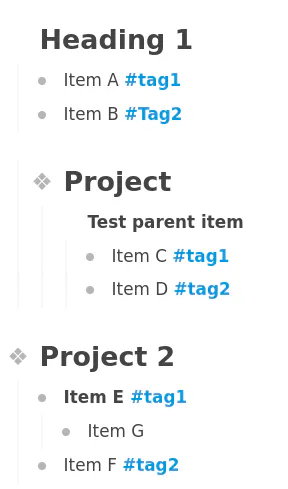
In outline view, grouping by headings or by project, it's fairly clear what is happening. The structure of the list stays intact. Now compare this to the list view. Without grouping it becomes clear that the list is simply flattened. However when you start grouping things become harder to understand:
Grouping by header in the list view gives me this:
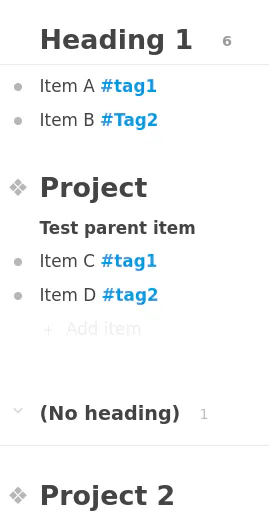
Project 2 is indeed without a header, but why are it's children not shown? Item E and Item F are not visible and no caret to expand Project 2. If I filter for #tag1 then I get what is visible. No Item E.
Removing the filter for #tag1 and trying something else, I click on Project 2 and I see
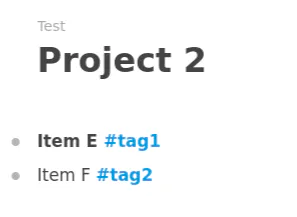
Now Item G is not visible.
Ok, if I go back to the full list, now I change grouping to be by project, I get this:
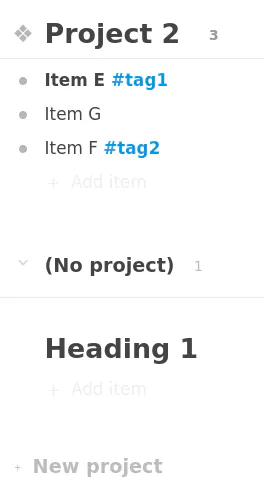
Project 1 is nowhere to be found. I feel like this is a bug where the items under whatever is the first level of the "No x..." grouping don't get included. But that doesn't explain why Item G was missing a few steps back with this:
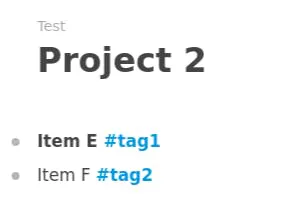
Is this expected behavior? If it is, what are the rules for deciding what will be included in the list? I'm going to go out on a limb and class this as a bug.